| |
|

|
|
Help: New users |
An online wishlists Account
|
An online wishlists Account
With an online wishlists account you can easily order gifts and view your order history.
2 possibilities:
Through the main page
- Click on the link "My Account ", "recent orders " or "Log out " on the main page of the online wish lists.
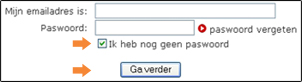
- Check the box "I have no password " and click "Continue ".
- In the next screen, if you have a loyalty card offers, your customer number and zip code.
Dot "No, I have no customer number " if you do not have loyalty.
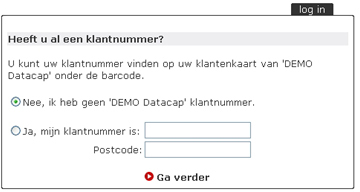
- Click "Continue ".
- Fill in your details. If you already have a loyalty card offers, your address from our system retrieved and you only need your email address and a password to give.
Tip: write down the password and store it properly. This password is needed for a gift to order online on a wish list and view your order history.
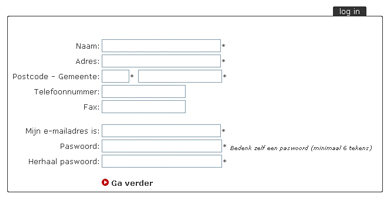
- Click "Continue ". A verwelkomingse-mail.
Through the ordering process
- During the ordering process choose in step 1 for "I'm new - I will soon make a password to ".
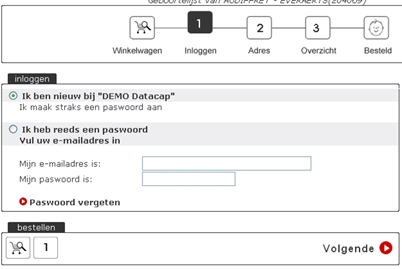
- Click "Next ".
- In the next screen, if you have a loyalty card offers, your customer number and zip code. Dot 'no, I have no account number "if you do not have a customer number.
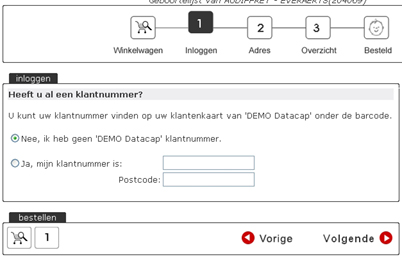
- Click the button "Next " to.
- Fill in your details. If you already have a loyalty card offers, your address from our system retrieved and you only need your email address and a password to give.
- Continue the order process to finalize your order.
Haut de la page
|
You still have not found what you are looking for? Please contact 056/43.09.43.
|
|
|
|
|
|